Google IO - What's new in Android
 At Google IO 2015 some exciting new announcements were made about new features in the Android operating system for developers.
Developers can now build apps for Android M by downloading the developer preview (API 22) and latest SDK. There will be a couple of versions of previews which will be improved before the final version is released.
Permissions
In Android M run-time permissions have been introduced. What this means is that the user won't have to accept a wall of permissions when they first install and application, instead they'll be asked to grant permission to that app to access a specific feature only when it's needed, and of course it'll remember the users choice so they'll only have to do it once for each permission for each app.
The user can also go into settings and view and adjust app permissions for all installed applications sorted both by app and also by a particular permission too which is handy. Basically everything users have ever wanted with permissions delivered. This will only be available for apps developed for Android M though. Legacy apps will remain the same, by asking all permissions up front on install, but they can still be adjusted from the phone settings. This means that your app must be tested in M to check all permissions work.
The user can also go into settings and view and adjust app permissions for all installed applications sorted both by app and also by a particular permission too which is handy. Basically everything users have ever wanted with permissions delivered. This will only be available for apps developed for Android M though. Legacy apps will remain the same, by asking all permissions up front on install, but they can still be adjusted from the phone settings. This means that your app must be tested in M to check all permissions work.
Voice Interaction
VoiceInteractor allows you to interact with the voice input system - there was already the capability for the user to launch an intent and use voice, but now with the voice category intent filter, so creating voice interaction request is really easy
Finger Printing
There is a new finger print manager in the API which allows for really easy integration of finger print authentication. Your app will still contain all the UI, and the API does all the work on the backend alternativley you can use the existing keyguard manager to show the lock screen to authenticate the user with their pin, code or whatever they set up.
Backup
In Android M by default all app data will be backed up to the users Google account. The user can opt out of this, as can the developer don't use the <full-backup> tags. Everything else related to user data was already backed up in previous versions of Android and will continue to be.
Google Play Services
Version 7,5 is out, one of the most exciting features of this is GCM network manager - this is every cool way of making sure that your network requests are going to be much more optimal for the device, even for older versions (unlike in L where the app had to have this explicitly written in). There's also a few more new features, like maps available for Android wear devices.
Power
Another focus on M is to improve battery life. A new feature called Doze has been implemented which uses the devices accelarometer to detect if the device has not been moved for a long period of time (like hours to days) and exponentially decreases the number of network requests and scheduled app processes until the device is moved. If there are real-time alarms or high priority tasks the device will be woken and they will have priority. As soon as the device is plugged in or moved Doze will turn off. Same will happen with apps you don't use (for a few days or weeks), less resources will be allocated to their background processes.
Data Binding
This idea obviously has been around on other platforms for a while but it's now being integrated with Android. Data binding is the ability to connect the data model to some of the UI elements in the application. Data binding is cool.
UI Features
The Android design support library has been updated with the new material design, with emmbed better practices. And a f-a-b button so developers don't have to create their own circles with a shadow anymore. Updates to recycler view and web view.
Notications
Now notifications can contain a resource id for their icon, this is cool because for the first time you can use a bitmap, you no longer need a million assets for each possible condition, they can now be generated on the go, like downloading an asset from your web back-end.
Text
Better text selection, (use ActionMode.TYPE_FLOATING in your code) for a floating pallet of icons, that'll be easier for users. The improved ability to process text. Also better formatted text, finally.
App Links
In Android M will now be able to distinguish between app and web links made by the same developer securely. Very simple to set up in manifest and on server with auto verify certificates and app links, so links to those urls will open in your app. As with everything else in M the user can take controll and modify this in settings.
Direct Share
Allowing the user to share more easily. Provide information with intent filter, with a certain intent return list of possible targets
Better Stylus Support
Stylus support has been around for a while, but it has been greatly improved in M. You can create a datastream to receive preasure and button data over BLE protocol Android can fuse this with touch data on the glass, what this means is you can build a bluetooth stylus that then records as a stylus on any app on M that supports stylus - no special hardware, no app modifications, no nothing complicated, so interrogating stylus data = very easy.
There will also be some motion events added in M to help deal with stylus'es like ACTION_BUTTON_RELEASE , BUTTON_STYLUS_SECONDRY.
Graphics and Media
RenderScript Compute:
BLAS intrinsics (... really big matrix'es)
Allocationless launches (size of kernal seperate from data)
ScriptGroup (more dependancy types, better compiler optimisations)
Also imporovements to camera API, even better flash light no longer linked to camera
Alpha Optimisation
MIDI
android.media.midi package has been introduced. You could already do MIDI, if you did it manualy. Now this new package will give the developer the bytestring that will be able to send and receive the not information.
Higher Res Audio
Now single precision float (rather the 16-bit sample of before) Multil chanel UB digital audio
Android Studio 1.3
Integrated testing support, tooling, new language support, more support for vector drawables, Android ndk development. Also Systray has been cleaned up.
Introduction to react.js
React is a JavaScript framework built at Facebook, it was built to answer the question "How should we structure JavaScript applications".
There are a lot of JavaScript frameworks that try to answer this question, most of them are MVC based (or MVVM or MVW) - basically they're all based around models - which are just observable objects that have some events api that allows you to subscribe to some changes on that object. So developers set up bi-directional data-binding that allow you to subscribe to changes on you r model, so whenever something changes you can mutate and update your view.
React is a JavaScript library for building user interfaces, you get all the good parts of a complete render, but without the downsides such as performance and loss of data.
At the heart of react is, declarative components - describing what components look at at any point in time
There are a lot of JavaScript frameworks that try to answer this question, most of them are MVC based (or MVVM or MVW) - basically they're all based around models - which are just observable objects that have some events api that allows you to subscribe to some changes on that object. So developers set up bi-directional data-binding that allow you to subscribe to changes on you r model, so whenever something changes you can mutate and update your view.
React is a JavaScript library for building user interfaces, you get all the good parts of a complete render, but without the downsides such as performance and loss of data.
At the heart of react is, declarative components - describing what components look at at any point in time
Initial Render
There is no explicit data binding, in react we just define one render function, and the purpose of this render function is to describe what your view looks like in any point in time. It returns a representation of your view. We recursive call render to build up this hierarchy. When we want to generate the mark-up of this representation for the first time, we take the representation and iterate over it generate a string and inject it into the document. This does something called two-pass rendering which is generating the string, then later, after the string is injected into the document we attach the event handlers at the top-level, which exposes some really interesting opportunities, since your generating your string somewhere separate from where your hooking up your events, you can render on the server.Update Rendering
Instead of mutation for updating react uses a process called reconciliation, the purpose of this is to keep you UI up-to-date as your data changes, automatically updates your views and DOM. The render function that does the initial rendering and returns a string representation of what our components should look like at that point in time, and react compares that with the current DOM and finds all the differences, based on those differences creates some DOM representations of just the relevant parts and updates the view.Building DOM Representations
Since the HTML is defined in JavaScript it would get a bit hard to understand for larger pages with a lot of nesting, there would be curly braces everywhere, so for that reason JSX syntax is used to define the elements. This is very similar to other templating engines and uses ordinary HTML-type syntax.
This post is based on information given by Tom Occhino from Facebook on his series about react.js
How to create a web service to send emails for you Android, iOS or web application
Since it's a common task to have to send emails from your app, this post outlines the quickest way to get a mail service up and running using server side JavaScript, Parse and Mandrill. No JavaScript or web coding experience is needed.
2. Download https://www.parse.com/downloads/windows/console/parse.zip
3. Extract the zip
4. Run parse console
5. cd into your working directory
6. run the command parse new <name-of-project>
7. make changes to your code if you like
8. run the command parse deploy
done

Set up Parse
1. Go to parse.com and create a cloud code app following the process2. Download https://www.parse.com/downloads/windows/console/parse.zip
3. Extract the zip
4. Run parse console
5. cd into your working directory
6. run the command parse new <name-of-project>
7. make changes to your code if you like
8. run the command parse deploy
done
Set up Mandrill
Mandrill is a is an email infrastructure service by MailChimp. It's free to use up to a limit of 12,000 emails per month (and 250 per hour) and it's easy to set up.
Head over to https://mandrill.com/ and sign up to get an API key.
The Code
Inside your new Parse project, there should be a folder called cloud, cd into that and create a file called main.js (if it doesn't already exist).
Paste the following code into cloud/main.js
Parse.Cloud.define("sendMail", function(request, response) {
    var Mandrill = require('mandrill');
    Mandrill.initialize('<Manddrill_api_key>');
    Mandrill.sendEmail({
        message: {
            text: request.params.text,
            subject: request.params.subject,
            from_email: request.params.fromEmail,
            from_name: request.params.fromName,
            to: [{
                email: request.params.toEmail,
                name: request.params.toName
            }]
        },
        async: true
    }, {
        success: function(httpResponse) {
            console.log(httpResponse);
            response.success("Email sent!");
        },
        error: function(httpResponse) {
            console.error(httpResponse);
            response.error("ERROR - mail failed to send");
        }
    });
});
And change the <api key> to your Mandrill API key (obviously withoiut the pointy brackets)
Once this id done, run parse deploy to push your work to parse.
Calling your service
Below is all the paramaters you'll need to send emails from your application.
URL:
https://api.parse.com/1/functions/sendMail
URL Parameter Key
|
Value
|
Content-Type
|
application/json
|
Accept
|
application/json
|
X-Parse-Application-Id
|
<Your_parse_application_id>
|
X-Parse-REST-API-Key
|
<Your_parse_rest_api_key>
|
Raw JSON body:
{
"toEmail":"someone@hotmail.com",
"toName":"jane doe",
"fromEmail":"someone_else@live.com",
"fromName":"john smith",
"text":"this is the email body for the main message",
"subject":"this is the email subject"
}
You will probably want to test this out before you include it in your app. A good way to do this is to use the PostMan client availible free on the Chrome store (similar versions will be out there for Firefox and Safari).
Fill in the form so that it looks like the image below, and you should see your new email service working :)


Digital Bucket - Charity Donation Collection App
 During the weekend of BattleHack I worked in a team developing a Digital Bucket Solution, a simple application that allows people to donate to charity bucket collectors even when they don't have any loose change, using their smart phone.
The backend was written in Node js and has an iOS client. It supports Apple Pay and all of BrainTree's services, it also uses iBeacons for detecting when you;v approached a charity collector.
Source Code for back-end
Web portal demo
Built my first PC!


I have finished building my computer!!!!
Christopher's got the AMD FX-8350 8 core 4 GHz processor, 16 GB of DDR3 1866MHz RAM, 2TB HDD and 240GB SSD, 2GB graphics card ( the Asus AMD Radeon R7 250X) and the Asus M5A97 EVO R2.0 MB
and LED lights because LED lights are COOL!!!


Finished building my PC! pic.twitter.com/tvI1JXqdM3
— Alicia Sykes (@Lissy_Sykes) May 2, 2015
Learn HTML5 in 40 minutes tutorial
Since EVERYTHING front-end related on the web is coded in HTML and HTML5 has a bunch of new features to make your web content more interactive and semantic, it is the language you need to know before you can do anything else web-related.
These videos should give you an overview of what HTML5 is and how you can use it to create web pages.
There are 6 videos in the series....
These videos should give you an overview of what HTML5 is and how you can use it to create web pages.
There are 6 videos in the series....
More resources relating to the videos above can be found at this URL:
http://web-dev.as93.net/html5-introduction
Enjoy :)
BattleHack London 2015 @ Tobacco Docks
 |
| My team |
Was a great weekend, my only disappointment was that I did not win an axe :(
 |
| Swag |
 |
| Stickers |
 |
| Caffiine |
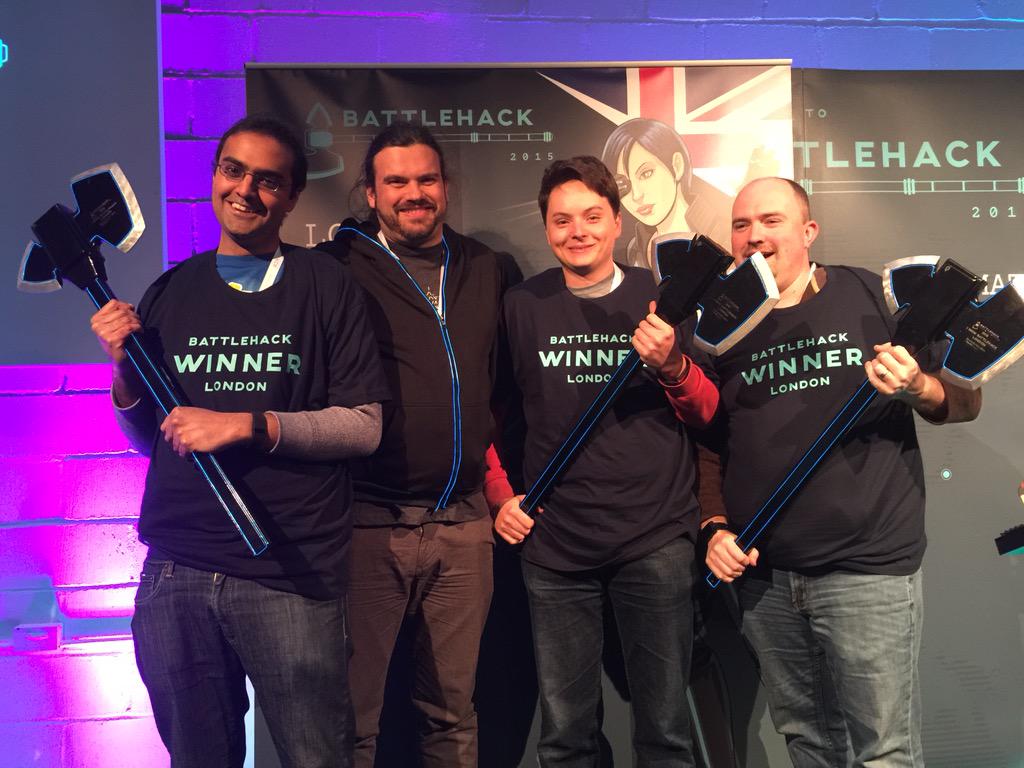 |
| The winners |
Apps World 2014
 Apps World 2014 in London was great this year, with over 1,600 attendees it was held at the ExCel, and had loads of good speakers and sponsors.
My favourite talks from day 2 were: first a talk titled responsive website or native app which was given by Geoff Parkhurst who's the CTO of Lovehoney, he weighed up the advantages and disadvantages of each side very nicely. This I found particularly interesting since it's relevant to work at the moment.
 Another great talk was given by Grant Allen from Google, on extreme wearables. This image (sorry for the bad quality photo) actually shows something really cool. the axis on the left is the % of people who are awake, the axis on the bottom is the time of night. As you can see, between 10pm and 1am, the % of people awake falls, since they've gone to bed, however at 3:30 AM, it suddenly rises, this was due to a huge earth quake that night. Each different coloured line is a different city, and this data could potentially be used to give a short warning to an earth quake to people in further away cities. This particular data came from JawBone, but any basic activity tracker would have recorded similar results, and would have the scope to implement this.
I also attended several other very interesting talks seen here


Study Time - Developed app to reduce distractions while studying
Introduction
Study Time is an open source Android application to reduce distractions while studying.
 Any student will know that mobile phones are a massive distraction to studying, but also have some utilities that help you get your work done, such as calculator or Wikipedia. This weekend I developed an application that aims to reduce the distractions cause by your Android device.
The interface is simple, you enter the amount of time you need to stay focused for, and press start. Study mode will mute all notifications and disable home and back buttons. It's not immediately easy to get out of the app once your in study mode, though you do still have access to core features such as emergency dialer, time... Once the timer reaches zero you once again have full access to your phone.
Technical Details
The app is built as a launcher that temporarily overrides the users default launcher. This will ensure that if they press the home button they can not close the app easily. There is also a timer that will run once study mode is enabled.
Links
 Google Play - the app is available to download for free from the Play store
GitHub - all code is open source and available on GitHub along with graphics
Amazon App Store - [coming soon to Amazon]
YouTube - promo video
Screen Shots
 |
| Start Screen |
 |
| Timer Screen |
Additional Views


Droidcon Conference London 2014
Droidcon London is a 2-day Android conference organised by Skills Matter.

I was a volunteer, so helped set up prior to the event, and in return was given a free ticket to attend both days :)
Sponsors
 There was also a wide range of sponsors including Microsoft Azure, Sony, PayPal/ Braintree, Intel, Epson, AppConverter, Amazon App Store, Facebook, Badoo, ooVoo and Google Developers. As well as many other Bronze sponsors. Attendees were free to talk to the sponsors about their software, products and services and ask questions (and get a ton of free t-shirts and stash!).
The Presentations

Day 2 saw was filled with talks and presentations given by the worlds leading Android experts. It kicked of at 9 AM with Chet Haase from Google discussing what's new in Android Lollipop. From 10 AM - 17:30 there 7 talks going on simultaneously throughout the day (35 in total). Meaning it was impossible to attend them all, however they were all filmed and made available on the internet later on.
The Party
 On Thuresday night, there was a networking session and party at a pup a few minutes down the road at the Wenlock & Essex. There was a free bar paid for by ooVoo, and plenty of food and more stash. The music was picked by the attendees and was GREAT!
 Setting Up
I volunteered to help set up the event the day before, and early the morning of the first day (it was the only way I could get a ticket, given the crazy high prices!). We arrived on Wednesday and Thursday at 06:30 AM and our time was put to good use packing 1200 goody bags, preparing flyers, folding thirsts and other general setting up jobs.
A few photos
 |
| Chet Haase - Practicing Practical Best Practices for Software Development Practitioners |
 |
| Cyril Mottier - Android Wear |

#DroidconUK Tweets
Vitality Oxford Half Marathon 2014
The Oxford half marathon is a 13.1 mile flat run though Oxford city, including Iffley Road, Cowely, the Mini Plant, the River Thames + Canal Path and this year the Iffley running track and a "Banister Mile" which was separately timed.
I tracked my run (as always) with Runtastic, by far my favourite sports tracking app. Below is a link the the session, also the map below is from the same session.
https://www.runtastic.com/en/users/Alicia-Sykes/sport-sessions/331596587
 |
| the start |
 |
| A not so great photo of me coming into the finish |
 |
| Map of the route, tracked using Runtastic |
https://www.runtastic.com/en/users/Alicia-Sykes/sport-sessions/331596587
PayPal Dev BattleHack London 2014
 BattleHack is an annual world wide hackathon run by PayPal. This year I was lucky enough to once again get a ticket to the London event, which took place on the weekend of the 11th - 12th October 2014, at Level 39, Canary Wharf. Level 39 as always an amazing venue with a 360 degree panoramic view of London and Canary Wharf.
As with previous years the food was of course really good, and plenty of it, full breakfast, fish and chips for lunch, fare ground style snacks at tea, then hot dogs and PayPal fairy cakes and beer for dinner, and pizza for midnight snack - and that was just Saturdays meals!
The first few hours consisted of networking, opening talks and sponsor pitches. The sponsor talks were really good, and included SendGrid, Twillio, Nango, Relayr, context.io, JustGiving and NFC Ring. There was also an opportunity afterwards to talk to the sponsors and get help and information about using their products (and free t shirts and stickers!).
I was also very happy, since I won a Leap Motion Controller without even having to do that much! Thanks PayPal! It is a pretty cool piece of tech, so I will create a blog post reviewing it a bit later today.
Unfortunately I was unable to stay for the whole weekend (since I was running in a half marathon on Sunday morning) but I spent Saturday hacking into the early hours, and watched the presentations of the other hackers online after the event had finished. Some very cool stuff was created during BattleHack London 2014
:)


First prize included winning an axe! How cool!?
Subscribe to:
Posts
(
Atom
)



 Posts
Posts


